The game will be a fantasy/action/fiction/shooter game where you can pick the character between few races, you re more than welcome to bring you’re own ideas to the character construction [ Demons,Angels,Humans,Orcs,Undeads,Reptilians,etc]. This is an example of the type of game I want to create just different characters, textures,attacks,etc. More inspiration
Down here you have some examples for inspiration for the idea of a character , I will need to see them in full and each individual part [legs/chest/head/wings,etc]
This slideshow requires JavaScript.
The characters needs to be first created by certain sizes have bold lines and not too many details as the size might be decreased to an certain amount of pixels .The character will need like minimum 4 sprites for each action like : Idle , Running , Shooting[using magic skills] , Kicking , etc.
Here is an idea of how to animate it , but I might need each animation in different layer …I will explain you how to do that if that’s needed
Here is an idea of how to animate it , but I might need each animation in different layer …I will explain you how to do that if that’s needed
Here is an idea of how to animate it , but I might need each animation in different layer …I will explain you how to do that if that’s needed
Here is an idea of how to animate it , but I might need each animation in different layer …I will explain you how to do that if that’s needed
There will be bosses where everybody can be creative , the boss can be a bigger size , different animations,more details , etc .
Notes:
Please don’t make characters with too many parts because to animate them I have to add them bones and I will have to add them manually and for the prototype version of the game I need characters a bit more detailed than this :
The game will be a fantasy/action/fiction/shooter game where you can pick the character between few races, you re more than welcome to bring you’re own ideas to the character construction [ Demons,Angels,Humans,Orcs,Undeads,Reptilians,etc]. This is an example of the type of game I want to create just different characters,textures,attacks,etc.
Down here you have some examples for inspiration for the idea of a character , I will need to see them in full and each individual part [legs/chest/head/wings,etc]
This slideshow requires JavaScript.
The characters needs to be first created by certain sizes have bold lines and not too many details as the size might be decreased to an certain amount of pixels .The character will need like minimum 4 sprites for each action like : Idle , Running , Shooting[using magic skills] , Kicking , etc.
Here is an idea of how to animate it , but I might need each animation in different layer …I will explain you how to do that if that’s needed
Here is an idea of how to animate it , but I might need each animation in different layer …I will explain you how to do that if that’s needed
Here is an idea of how to animate it , but I might need each animation in different layer …I will explain you how to do that if that’s needed
Here is an idea of how to animate it , but I might need each animation in different layer …I will explain you how to do that if that’s needed
There will be bosses where everybody can be creative , the boss can be a bigger size , different animations,more details , etc .
Notes:
Please don’t make characters with too many parts because to animate them I have to add them bones and I will have to add them manually and for the prototype version of the game I need characters a bit more detailed than this :
And this will be an example how the animation of the character will work 😀
The Leas Lift was installed initially in 1885 in Folkestone with the purpose of carrying passengers between the seafront and the promenade . Is one of the oldest water lifts in UK . Even if the picture are just black and white you can see the beauty of the nature combined with a bit of technology when they’ve been built , here are some visual proofs of the oldest Leas Lift :
This slideshow requires JavaScript.
And here are some new pictures from The Leas Lift from our days :
This slideshow requires JavaScript.
The lift operates using water and gravity and is controlled from a small cabin at the top of the cliff. I think water fills an unseen container inside of the leas which when is heavy enough I think will make counterbalance to the leas from the ground and will make the movement between the two of them to invert them places . Here is a proof of how I imagined the lifts will works .
Assessment :
Write a few paragraphs , imagining what it was like travelling in the lift m either as a young kid , a teenager or an adult .
I can only imagine that along the time with the technology boost we had the feeling we have it no when we go with the leas is not the same as it was at the very beginning .
That time the leas was something new , not too many people had access to one of them so to have a travel with the leas probably would make you feel curious, special , excited of new , a happiness that the kids these times don’t see it too often .
Write a proposal for a program that you will create to celebrate the Leas Lift and comment on how contextual awareness will influence your design/ideas.
I was thinking to adapt my 2D game in progress with two moving platforms that will take the role of the Leas Lift
Here is the 2D game at the basic version , then I need to add the Leas Lift after this part of it.
Task Finished:
This would be the proof of the finished game based on the Leas Lift idea adapted .
Photoshop is a raster graphics editor developed and published by Adobe System for macOS and Windows it can be used for resizing and isolating images applying filters and drawing .
1st Task:
Reach and Identify 3 fundamental differences between raster based and vector based graphic editors.
Raster images are made up of a bunch of tiny pixels, while vector images are made from mathematical paths.
Because a vector image is made up of mathematical paths, you can increase the size of the image as much as you want and it would never decrease in quality. You could literally increase the size to 3 million x 3 million and all the details would still look sharp.
Here is an visual example of the difference between Raster/Vector based graphics
Create a screen grab of the logos and various color ways:
2nd Task:
Using the eyedropper tool compare the difference in RGB color values .
This slideshow requires JavaScript.
The only way I can imagine they obtained the color in this picture is with map function and width .
Coding Challenge :
Develop a sketch that uses the array function to cycle through the color segments as you click on the logo .
Create a code to represent 6 lines on the display in groups of two . Each two with a different color [ Red , yellow and green ]
Research:
I had to look over some codes and I managed to see how can I make the program works , and my first code made by myself will look like this :
This is a basic version of what I’ve got , now I wanna modify it to make it an algorithm which will select by itself the colors of the lines .
Development :
I adapted an example code to make it more likely like me then I found a bug , there is a small green line between red and yellow which shouldn’t be there .
Explain (or suggest) the technology used to produce it.
Explain coding tools/techniques used to produce it.
Explain any safety/security measures that had to be put in place.
Propose a project,based on the work , that you could produce.
Start designing / creating a prototype.
Description + Images
I picked Tom Betts site from the first second I’ve opened it because it is about graphic/visual arts .Tom is partial-academic with a Phd in “video games and sublime” . He use technology to give another meaning to sublime , that breath taking piece of art , he tried to do with codes .Tom used to be a musician then he self taught to be a programmer who makes GAMES that generally feature procedural generation or generative art.
This slideshow requires JavaScript.
The concept/inspiration
Tom called the snowflakes concept : “Sets of polygons rasterized into texture data using Rotational & reflective symmetry to make Snowflakes/flowers.”
Technology used to produce it
As the artist doesn’t say anything about the technology that creates the code for the snowflakes I will presume that he used a computer to create the snowflakes.
Coding tools/techniques used to produce it
I think he used a programming languages like Java or CSS to write the code which create the snowflakes .
Safety/security measures that had to be put in place.
There are not so many threatens because the environment is online and the only risk he can take is the page to be cloned / hacked .
A project that I could produce :
I am thinking to produce the snowflake project because it would be a challenge just to create it , then I would like to offer to the snowflakes couple of interactive form that will transform it each click/etc.
Design
I have research some snowflakes codes then I tried to write my own with an example ….first try will look like this :
This slideshow requires JavaScript.
After I understood and adapted a bit the code I managed to get it to the version where shows some snowflakes but they are picked by me .
This slideshow requires JavaScript.
The final version of the code will be a lot simplified and will make each click to generate a new snowflake !
At this moment I am really happy with the work I’ve done and I think it has a good looking . I think it might be improved but that would require a more advanced technique of coding to create an fully random pattern of snowflakes to look at a decent level .
Here is a list with reasons why I picked WordPress as a platform to save my ideas/work
I have access anytime,anywhere just connected to the internet , even on my phone ,
I can save each individual idea in is own post,
I’m not having on my notebook Word documents to fill my HDD,
I can share my work with other people and get a tip/advice,
I am saving trees because I am not using paper .
Programming for the Visual Art with Processing
Introduction
I’ve been set a task to create a processing visual representation of the traffic lights.
Research
I’ve research and I’ve seen most of the car traffic lights are circular and the pedestrian lighters
The pedestrian lighters have most of the time a hand or a man sitting/walking to show us when is the right time to cross the street/sit
Other traffic lights have a timer to show us how long we have left to cross the street
The order of the traffic lights is : Red , Red and Amber , Green , Amber
The RGB of the colors are : (45,201,55) , (231,180,22) , (204,50,50)
Here are some examples of traffic lights from all around the world
This slideshow requires JavaScript.
Planning
I am thinking to create a special kind of traffic lights , but first I need to look for some .PNG images to make it easier and more interactive .
I will try to make a rectangle traffic lights with some colored circles in the middle of each color and I’ll see how can I add some pictures to make it even easier for young people to understand it
Then try to make everything interactive and make them work interactive
Development for the coding task
I’ve give it couple of tries then I finally got to a decent and stable point of my traffic lights
This slideshow requires JavaScript.
I kinda mixed the traffic lights , the pedestrian ones with the car ones but I just want to make it circular to look like a real light and then I went to be a bit more challenging for me to make it with a picture in … I think I could add a car as well .
Coding Task Finished
Programming with Python
Introduction
I’ve been tasked to create a traffic lights sequence this time in Python , based on text and interactivity .
Research
Python is an interpreted high-level programming language for general-purpose programming.
Python features a dynamic type system and automatic memory management.
Support multiple programming paradigms,including object-oriented , imperative,functional and procedural , and has a large and comprehensive standard library.
Has IDLE[integrated development environment]
Planning
First I have to look for some tutorials to have an basic idea how the functions/variables/commands are over there
Then I need to find the right sequence of code to write and to sort them in the right order
I am trying to keep everything inside of Python and IDLE because most of the tutorials use Notepad++ or stuff like that
I’ll ask some of my colleague which have an idea of how to use Python for some help
In the worst scenario in case I can’t do any if these , I’ve seen there is a Python manuals
Development
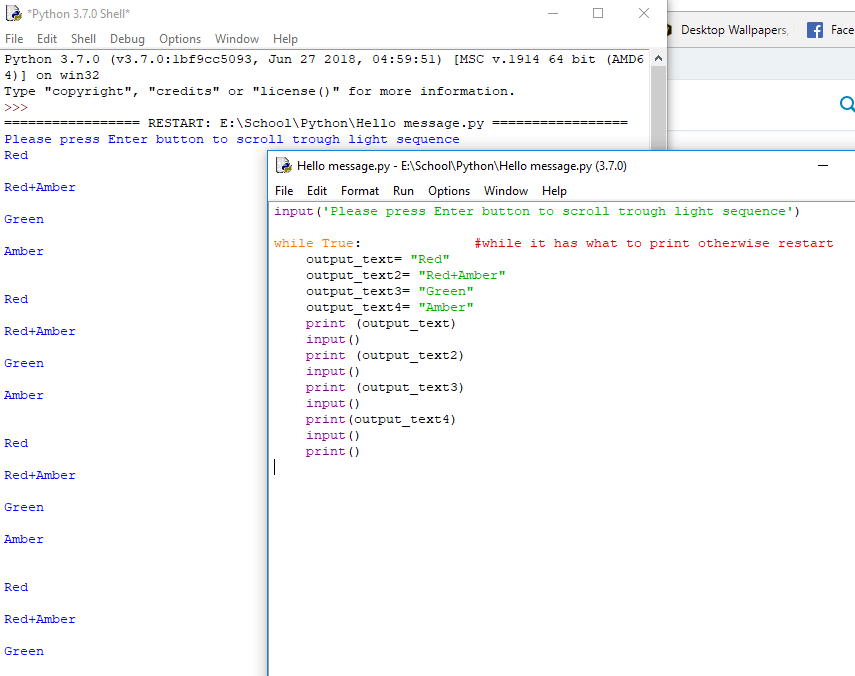
It wasn’t a good idea to make everything I write in Python to run it with Command Promt
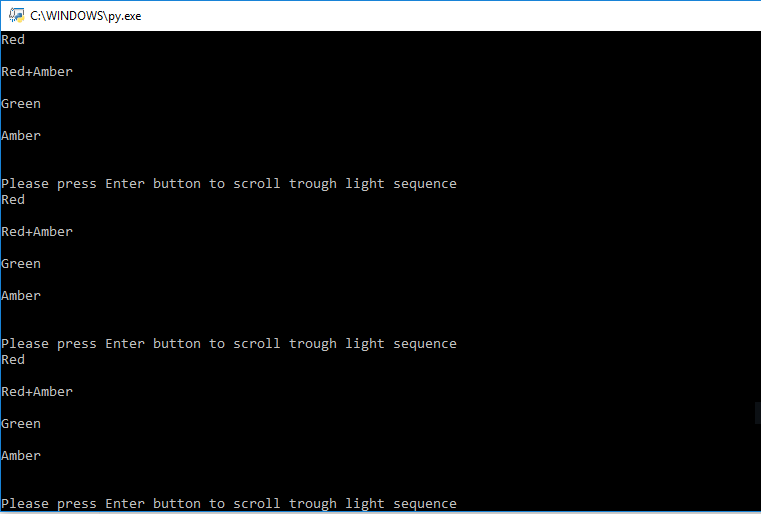
Then it needs some modifications because it shows always “please press enter…”
Coding Task Finished
I just had to take the command out of the loop .
Programming on Raspberry PI
Task:
Connect LED’s to a Raspberry Pi (or use the traffic light ‘stick’) and write a traffic light program.
Research :
To make this works we would need the following :
A Raspberry PI
A power supply
A Micro SD card to install you’r operating system on
A set of traffic lights
A USB mouse and keyboard
A HDMI display and cable
Python [IDLE]
Development :
I found a code for traffic lights on Raspberry PI which looks like that :
And I’ve been explained to arrange the Traffic Light Stick on the right pin’s (GPIO) on the Raspberry PI after this example :
Create programs in Processing that use the map() and translate() functions. The programs you write should have a creative / expressive outcome .
Research:
This is a rough description of the code I have to create for today …. to upload a picture into processing then to make curtains to be drawn.
Development :
This program uploaded the picture then I made it fade depending on the position of the mouse
Code Task Finished:
After few try , I managed and I finished the code with the map function and it still has an error , the curtain come from the right hand side to the left , instead from the left to the right …. but at least the code is done
I have to import audio into Processing (and/or Python) and add this to your traffic light program.
Research
To import audio into Processing I will need to import a library named Minim [this is the version with less bugs]
Development
In here I just have to combine the code with the traffic light[have a look at the top of the page to see the traffic lights code] , and I’ve researched about a new code to import audio files into the processing that will look like
That error is because they don’t have specific details about the downloaded song I made it play on the background .
Code Task Finished
This slideshow requires JavaScript.
and a video with the file working will be uploaded on YouTube soon !
Photo manipulation involves transforming or altering a photograph using various methods and techniques to achieve desired results . Some photo manipulations are considered skillful artwork while others are frowned upon as unethical practices , especially when used to deceive the public , such as tat used for political propaganda , or to make a product or person looks better.
Pointillism is a technique of painting a small , distinct dots of color are applied in patterns to form a image
Van Gogh self portrait with the technique of pointillism
Development
I got the task to write the code that make that from itself and then to modify the code for a better understanding .
Code:
I’ve realized the dots take the colors from the picture I’ve selected so I got another a bit more colorful picture and I’ve created this
Output
To be more accurate it needs the pixels to have smaller values
The idea is to write a code to make 3 distinct flags appear depending on my mouse position and each flag to have the name of his country in it .
Research
I’ve researched thru my first written codes and I found the code to make a flag
Now I had to research to find a code that will change the flag colors depending on width coordinate
Then I had to add the name of each country into their flag
Development evidence
That might be a easier way to make them appear with an algorithm but I’m quite proud of this
Testing
Tip: When u do prints with snipping toll you cannot see your mouse icon .
Final Reflection
I consider it as being a easy first task , even if I wouldn’t know to make it from scratches without the guidance of my colleagues / tutors .
Next time when I’ll make a code what have as coordinates mouse X and Y points for evidence use the Print Screen Button because is gonna reveal the mouse icon on the print screen .




 My portofolio