
Why WordPress
Hello everyone ,
Here is a list with reasons why I picked WordPress as a platform to save my ideas/work
- I have access anytime,anywhere just connected to the internet , even on my phone ,
- I can save each individual idea in is own post,
- I’m not having on my notebook Word documents to fill my HDD,
- I can share my work with other people and get a tip/advice,
- I am saving trees because I am not using paper .
Programming for the Visual Art with Processing
Introduction
I’ve been set a task to create a processing visual representation of the traffic lights.
Research
- I’ve research and I’ve seen most of the car traffic lights are circular and the pedestrian lighters
- The pedestrian lighters have most of the time a hand or a man sitting/walking to show us when is the right time to cross the street/sit
- Other traffic lights have a timer to show us how long we have left to cross the street
- The order of the traffic lights is : Red , Red and Amber , Green , Amber
- The RGB of the colors are : (45,201,55) , (231,180,22) , (204,50,50)
- Here are some examples of traffic lights from all around the world
Planning
- I am thinking to create a special kind of traffic lights , but first I need to look for some .PNG images to make it easier and more interactive .
- I will try to make a rectangle traffic lights with some colored circles in the middle of each color and I’ll see how can I add some pictures to make it even easier for young people to understand it
- Then try to make everything interactive and make them work interactive
Development for the coding task
I’ve give it couple of tries then I finally got to a decent and stable point of my traffic lights
I kinda mixed the traffic lights , the pedestrian ones with the car ones but I just want to make it circular to look like a real light and then I went to be a bit more challenging for me to make it with a picture in … I think I could add a car as well .
Coding Task Finished

Programming with Python
Introduction
I’ve been tasked to create a traffic lights sequence this time in Python , based on text and interactivity .
Research
- Python is an interpreted high-level programming language for general-purpose programming.
- Python features a dynamic type system and automatic memory management.
- Support multiple programming paradigms,including object-oriented , imperative,functional and procedural , and has a large and comprehensive standard library.
- Has IDLE[integrated development environment]
Planning
- First I have to look for some tutorials to have an basic idea how the functions/variables/commands are over there
- Then I need to find the right sequence of code to write and to sort them in the right order
- I am trying to keep everything inside of Python and IDLE because most of the tutorials use Notepad++ or stuff like that
- I’ll ask some of my colleague which have an idea of how to use Python for some help
- In the worst scenario in case I can’t do any if these , I’ve seen there is a Python manuals
Development
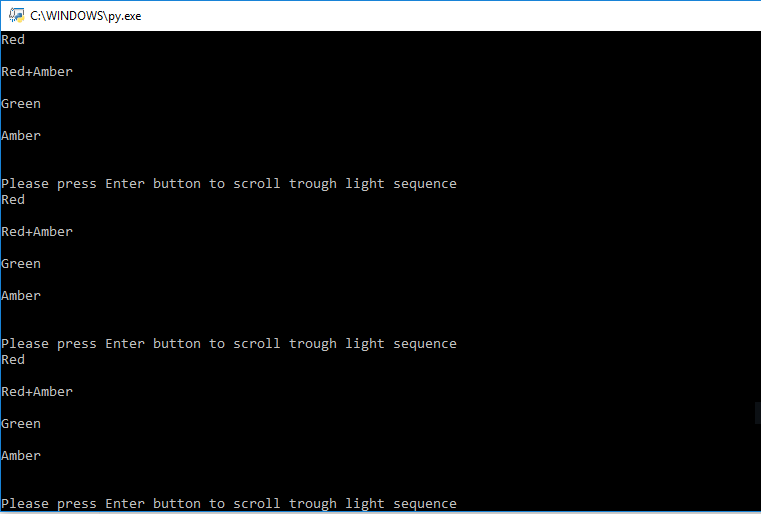
- It wasn’t a good idea to make everything I write in Python to run it with Command Promt
- Then it needs some modifications because it shows always “please press enter…”
Coding Task Finished
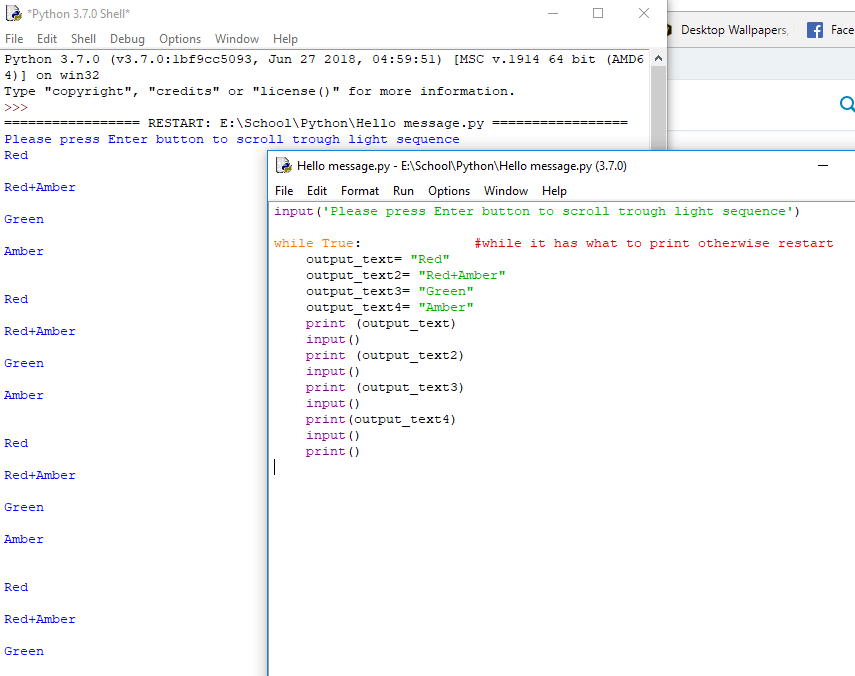
I just had to take the command out of the loop .
Programming on Raspberry PI
Task:
- Connect LED’s to a Raspberry Pi (or use the traffic light ‘stick’) and write a traffic light program.
Research :
To make this works we would need the following :
- A Raspberry PI
- A power supply
- A Micro SD card to install you’r operating system on
- A set of traffic lights
- A USB mouse and keyboard
- A HDMI display and cable
- Python [IDLE]
Development :
I found a code for traffic lights on Raspberry PI which looks like that :

And I’ve been explained to arrange the Traffic Light Stick on the right pin’s (GPIO) on the Raspberry PI after this example :

Coding Task Finished:

Traffic Lights Sequence on Raspberry PI
Processing Map function
Introduction
Create programs in Processing that use the map() and translate() functions. The programs you write should have a creative / expressive outcome .
Research:

This is a rough description of the code I have to create for today …. to upload a picture into processing then to make curtains to be drawn.
Development :

Code Task Finished:
After few try , I managed and I finished the code with the map function and it still has an error , the curtain come from the right hand side to the left , instead from the left to the right …. but at least the code is done

Importing Audio Files
Introduction
I have to import audio into Processing (and/or Python) and add this to your traffic light program.
Research
- To import audio into Processing I will need to import a library named Minim [this is the version with less bugs]
Development
In here I just have to combine the code with the traffic light[have a look at the top of the page to see the traffic lights code] , and I’ve researched about a new code to import audio files into the processing that will look like

Code Task Finished
and a video with the file working will be uploaded on YouTube soon !
 My portofolio